





































































10. How to Use the Coaxial/Optical Output Function on the DT11
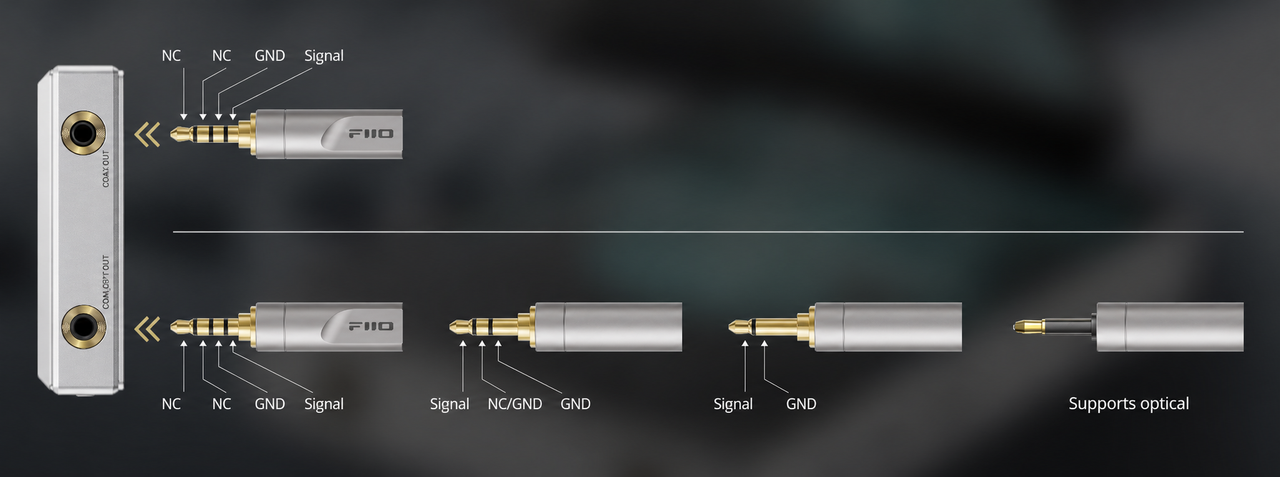
DT11 uses coaxial output by default. Connect the DT11 to an external DAC using a coaxial or optical cable with the correct pin configuration, then start playback to output audio.
The COAX/OPT OUT port on the top of the DT11 supports optical output. Before using this function, go to Settings > Audio and enable Optical Output, or enable it directly from the drop-down menu.
A 3.5mm mini-TOSLINK to standard TOSLINK optical cable or adapter is required.
Notes:
a. When using coaxial output, the digital audio signal is decoded by the external DAC, while the DT11 functions as a digital transport.
b. If there is no sound during playback, go to Settings > Audio > SPDIF OUT and select D2P mode.
c. The coaxial cable pin configuration is shown below:
ꄘViews:0
